Roomi: the AI that runs your hotel from a chat
Roomi is the AI front desk assistant built into RoomFollow. Write or say what you need: it prepares the reservation, check-in, payment, cleaning status or report from your hotel's own data. Nothing is saved until you approve it.
On the computer and on the phone · Turkish, written or spoken
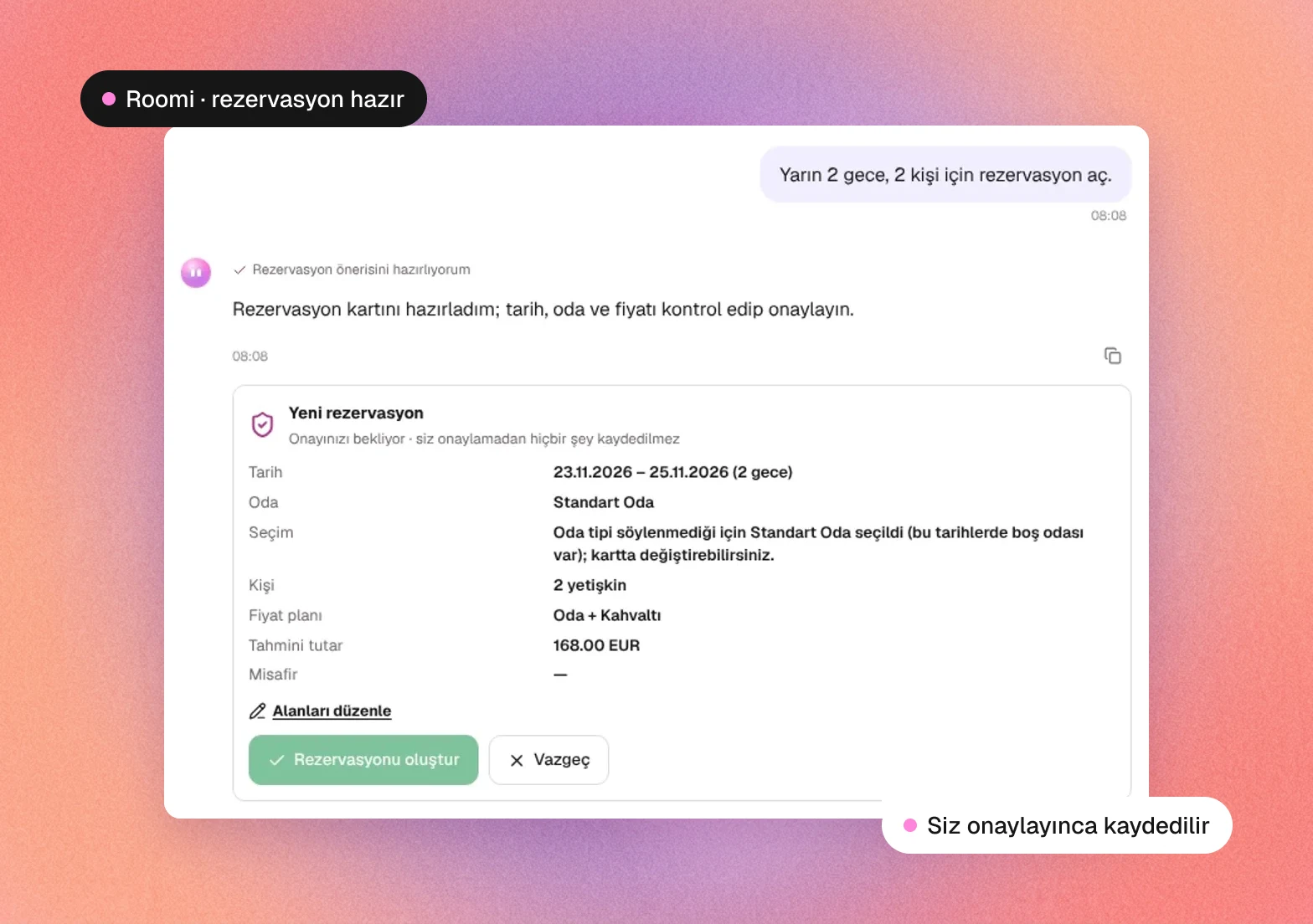
Write it the way you would say it at the desk.
Roomi understands everyday Turkish, room numbers, dates such as “next Friday” and small typos. If information is missing, it asks one short question instead of filling a form.
Book 2 nights for 2 people from tomorrow.
Picks a room type with free rooms, calculates the price from the rate plan and brings the reservation card for your approval.
(drops a passport photo into the chat)
Reads the passport, fills in the guest card and prepares the reservation or check-in with that guest.
Enter the guests in this Excel file.
Reads the list, skips duplicates and opens all guest cards with a single approval.
Room 305 paid 2,000 TL in cash.
Prepares the payment for the room's folio and shows the new balance once you confirm.
Move 305 to 402.
Checks that 402 is free and prepares the room change.
The air conditioning in 105 is not working, urgent.
Opens an urgent work order for maintenance with the problem taken from your sentence.
Show last month's ADR report.
Runs the report with the same calculation as the Reports screen and links to the full report.
Where is the nearest pharmacy on duty?
Searches the internet and answers with the source. No guest information is sent to the search.
The daily work of the front desk, from one chat.
Roomi can open every screen in the menu. For the jobs below it does the work itself in the chat.
 ReservationNew, changed, cancelled and no-show bookings, group bookings and bulk cancellation.
 Room plan and front deskFree rooms, room assignment, check-in, check-out, room changes and blocks.
 ID and passport readingUpload a photo or take one with the phone camera; the guest card fills itself in.
 Bulk entry from ExcelCreate guest cards or reservations from an Excel or CSV list in one go.
 Folio, cash desk and night auditFolio balance, charges, payments, folio transfer, cash summary and closing the day.
 Housekeeping and maintenanceAsk and change room status (dirty, clean, inspected) and open work orders.
 140 ready-made reportsOccupancy, revenue, ADR, forecast and in-house lists with the same figures as the report screen.
 Accounts and salesAgency balances, account collections, payment promises, sales offers and special days.
 Notes, complaints, lost and foundRoom and reservation notes, guest complaints, lost and found, safe deposit boxes.
 Exchange rates and phone book“How much is 100 euros in TL” with the hotel's recorded rate, and numbers from the phone book.
 Internet searchPharmacy on duty, directions, accommodation tax and public holidays, with the source.
 Help and supportAnswers “how do I do this” questions and opens a support request to RoomFollow.
Nothing is saved until you approve it.
Roomi reads freely, but every record it would change comes to you as a card first. You check the date, room and price, edit them if needed and approve.
 Approval card for every recordReservations, payments, check-ins and cancellations are written only when you press the button.
 Works with your permissionsRoomi cannot do anything the user is not allowed to do in the panel.
 Guest data stays protectedID images, ID numbers, phone numbers and e-mail addresses are never sent to the AI model.
 Private chat historyYour chats are stored encrypted, only you can see them, and they are deleted after 30 days.
 Rates stay on their screenRate and allotment changes go to channels instantly, so Roomi deliberately leaves them to their own screen.
- Answers from your own dataOccupancy, balance and report figures come from your hotel's records, not from a guess.
Wherever you work.
- 01
In the web panel
Click Roomi in the bottom-right corner of the panel or press Ctrl/⌘ + J. The chat opens full screen with your past conversations.
- 02
On the phone
Open the panel in the phone's browser and Roomi works full screen. Photograph the passport with the phone camera and continue the work at the room door.
- 03
By voice
Ask with the microphone button in Chrome or Edge, or turn on spoken answers. On the phone, the dictation keyboard does the same job.
Questions about Roomi
What is Roomi?
Roomi is the AI front desk assistant inside the RoomFollow hotel management program. Staff write or say what they need in plain Turkish; Roomi answers from the hotel's data and prepares the record for approval.
Can Roomi make a reservation on its own?
Roomi prepares the reservation: it picks the room type and a free room and calculates the price. The reservation is created only when the user approves the card.
Is guest information sent to the AI?
ID and passport images, ID numbers, phone numbers and e-mail addresses are not sent to the AI model. Documents are read by RoomFollow's own ID reading system, and the internet search never receives guest information.
Which language does Roomi speak?
Today Roomi understands questions written or spoken in Turkish and answers in Turkish.
Can Roomi change rates?
No. Rate and allotment changes reach the sales channels instantly and a wrong command would be costly, so Roomi opens the rate screen and explains how to do it instead.
How do I start using Roomi?
Roomi is in beta. Book a demo or write to our support team to have it switched on for your hotel; it then appears in the bottom-right corner of the panel.